Everything Diagnosa HP can do
A full explanation of every feature, with the real detail you'd actually see in the app — not just a short highlight.
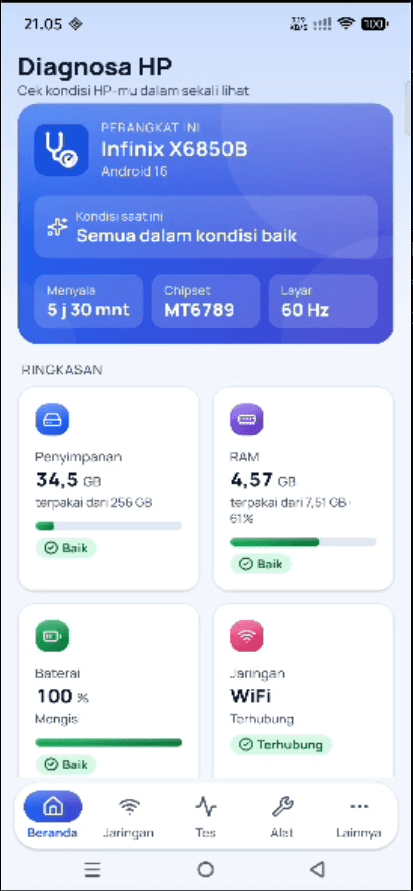
One screen, everything you need to know
The moment you open the app, the top summary card shows your device's name and model, chipset, uptime, and screen refresh rate, plus a one-line overall status. Below it, storage, RAM, battery, and network each get their own card with a progress bar and a status label — not just a number with no context.
- Model, chipset, and Android version read automatically
- Overall phone status summed up in one line
- Storage & RAM with a progress bar and percentage
- Battery & phone temperature: level, charging, thermal status and health
- Network: connection type and signal strength
A speed test that's transparent about its data
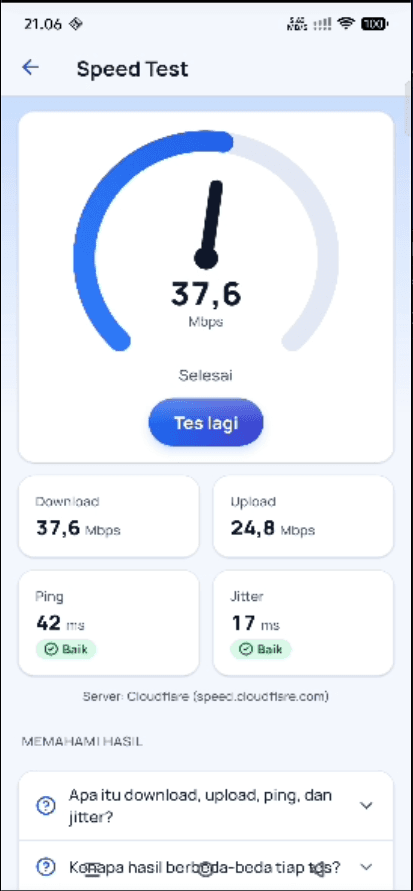
One tap and the needle starts moving, measuring download, upload, ping, and jitter against a public test server (Cloudflare) — the server's name is shown plainly, not hidden. There's a short explainer for terms you might not know, and your result history is saved on your phone.
- Real-time needle gauge, not a generic progress bar
- Download, upload, ping, and jitter broken out separately
- The test server's source shown transparently
- Speed test history saved locally, deletable anytime
- WiFi info (SSID, signal strength) and cellular status
Internet speed you can always see
Diagnosa HP's flagship feature: real-time internet speed shown right in the status bar, like a tiny speedometer that's always on — the number comes straight from the system, not a simulation. It can run automatically on boot, and automatically stops updating when the screen is off to save battery.
- Dynamically drawn notification icon — real numbers, not an animation
- Download, upload, battery temperature and today's total in the notification
- A "Run on boot" option
- Automatically pauses when the screen is off to save battery
- Available on Android — on iOS, replaced by a widget & Live Activity
Diagnosa HP
↓ 2,4 MB/s · ↑ 180 KB/s
Temp 34.5 °C · Monitored today: 1.2 GB
Illustration of the Android status bar & notification
An honest Full Test — judged automatically
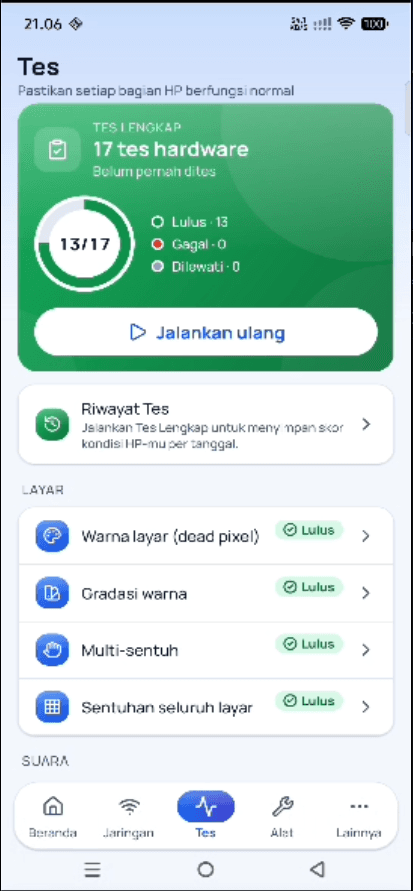
17 hardware checks run in order and the app itself confirms the result: a random tone plays on the speaker and must be heard by the microphone, vibration must register on the motion sensor, the camera must deliver a picture, a fingerprint/face must verify. Users can only skip — and skipped tests lower the score, so a broken part can't be hidden.
- 17 hardware tests in one guided flow
- Results measured automatically; nothing can be marked "working" by hand
- Speaker & earpiece checked through the microphone with a random tone
- Touchscreen: finger count & responsive screen area are measured
- Screen colour tests (dead pixels) are recorded as visual checks, not scored
Everyday tools, no other app needed
A flashlight with strobe/SOS mode, a compass, a 1D & 2D bubble level, an estimated decibel meter (honestly labeled "uncalibrated"), a QR/barcode scanner & generator, and unit converters for data, speed, length, and temperature — all ready to use without opening another app.
- Flashlight with strobe & SOS mode
- Compass and a 1D/2D bubble level
- Decibel meter — honestly labeled "uncalibrated"
- QR/barcode scanner & generator (text, URL, WiFi)
- Unit converters: data, speed, length, temperature
One report, ready to share
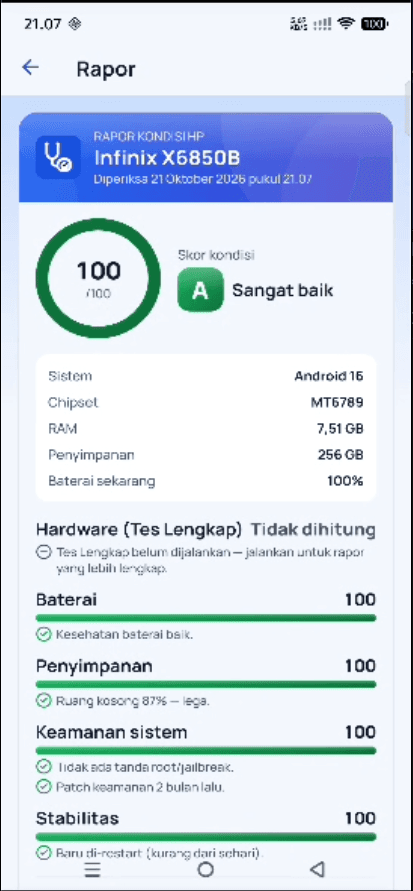
Every report automatically re-runs all hardware tests, then combines them with battery health & temperature, free storage, system security and stability into a 0–100 score and an A–D grade. The "Hardware test details" section shows what was measured for each part — export it as an image or PDF for a buyer or seller.
- All tests re-run for every report
- 0–100 score plus A–D grade at a glance
- Details for every hardware part with its measurement
- Date & device-model watermark
- Export as image or PDF, ready to share on WhatsApp etc.
Your phone's condition without opening the app
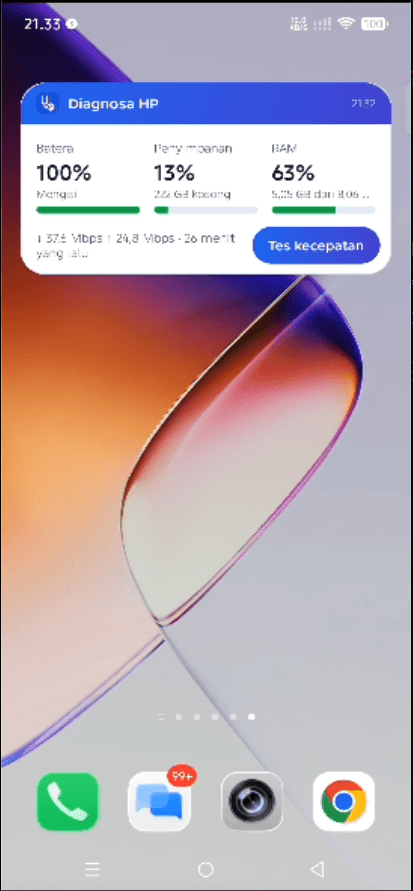
Add the Diagnosa HP widget to your home screen — battery, remaining storage, and RAM usage are visible at a glance, along with your last speed test result and when it was measured. There's a "Test Speed" button to run a new speed test instantly without opening the app first.
- Battery, storage, and RAM in one widget
- Last speed test result with a timestamp
- A "Test Speed" button right from the home screen
- Updates to reflect your phone's current condition
- Available on Android — an iOS widget is coming
Ready to know your phone's real condition?
Download Diagnosa HP and get the full picture in a few minutes.